

Norman Sword
-
Posts
628 -
Joined
-
Last visited
Everything posted by Norman Sword
-
It does indeed mean National Coal Board. Software projects received a threatening letter from the National Coal Board, about usage of the NCB logo without permission. Remember this was at the same time as Mr Arthur Scargill, was having a good laugh with the NCB. Whilst the games MM and JSW do not have reference to The NCB (directly), the artist( Roger Tissyman) responsible for the cover design of the software projects release of these two games inserted the NCB graphic into his artwork.
-
from the post above Are you planning on doing JSW2 at any point? (For one, I always preferred JSW2 and secondly (and more selfishly), I'd love to look at the difference between the movement code between the first and second games.) The code for JSW2 was not a rewrite of Matthews code. It was writen from scratch, using just visual information from the original. e.g. Look at the game mechanics, and write the code. JSW's method of movement was not even looked at (source code or dissassembly)
-
And to take all the work out of modification... The data needed is in my "INVISIBLE TAP" file This is the minimum change needed to interact with willy - NOTE this omits the other changes I added ; to get this data look at these addresses in "INVISIBLE.TAP"- ; modification at start of rope draw - draw Willy to screen at #92a4 call willy_draw_on (3 BYTES) nop (1 BYTE) old LD IY,ytable (4 BYTES) ; with xor ??? if willy is present then no change here - leave to indicate looked at and aware of check at #92c9 and (hl) old (no change - read comment) AND (HL) ; the rope pixel changes from {or} to {xor} at #9311 xor (hl) (1 BYTE) old OR (HL) (1 BYTE) ; the final rope mode modification - get rid of Willy at #935e call willy_draw_off (3 BYTES) old LD A,(rope_status) (3 BYTES) ; Original Willy draw - now just saves data positions at #9660 jp save_willy (3 BYTES) old --- note 3 bytes which is the first instruction plus 1 byte from the next LD B,#10 (2 BYTES) LD A,(willy_att) (3 BYTES- ONLY FIRST BYTE NEEDS TO BE CHANGED) ; the code that is being called - org #9f00 screen_pos dw 0 screen_def dw 0 save_willy: ld a,(willy_att) and #1f or (ix+0) ; the x position ld L,a ld h,(ix+1) ld (screen_pos),HL ld (screen_def),de ret willy_pause: ld hl,(screen_pos) ; shift from #60 to #40 res 5,h call willy_xor1 LD DE,#0000 ret willy_draw_on: call willy_xor LD IY,ytable ret willy_draw_off call willy_xor LD A,(rope_status) ret willy_xor: ld hl,(screen_pos) willy_xor1: ld de,(screen_def) draw_xor: ld b,#10 loop_xor: ld a,(de) xor (hl) ld (hl),a inc de inc L ld a,(de) xor (hl) ld (hl),a inc de dec L inc h ld a,h and 7 jr nz,legal_val ld a,L add a,#20 ld L,a jr c,legal_val ld a,h sub 8 ld h,a legal_val: djnz loop_xor ret --------------------- PLUS Stop dancing willy routine - delete call remove Willy on plinth in death routine - delete call ------------------------------- A lot of effort for something I am not doing ---
-
Just checked the code - was aware it seemed different from what I normally do - e.g. was part modifying someone elses code. I can see the layout does not adjust for the screen 1/3rds correctly. so here, is how I do it as opposed to modifying someone else's code --- Too much time doing this. sprite_xor ld b,#10 loop_xor: ld a,(de) xor (hl) ld (hl),a inc L inc de ld a,(de) xor (hl) ld (hl),a dec L inc de inc h ld a,h and 7 jr nz,legal_val ld a,L add a,#20 ld L,a jr c,legal_val ld a,h sub 8 ld h,a legal_val: djnz loop_xor ret Addendum:- just to show what I said works --- 1) no idea what version of jsw I have used - so no idea how many of the original bugs are present 2) deliberately not the same as the file you want to edit. 3) comes equiped with spray paint - Pause to show where willy is 4) due to the pause addition.... Can play by pressing pause to see where willy is and movement keys .eg hold "gh" and play as normal. Willy is treated as still invisible in the game code. Addendum 2:- with a ghostbuster's radar - we track the invisible man. And that concludes my effort. INVISIBLE.tap INVISIBLE_Tracking.tap
-
because the sprite print routine adds pixels - it never erases pixels - similar to 1+4=5 or 1+3+2=6. The result never gets less no matter how many positive numbers you add.Although technically the print routine gives the result as (1 or 4 =5) and (1 or 3 or 2=3) NOTE - the routine I mentioned uses XOR - and any number xor'd with itself is always 0. So how difficult is the xor version of the sprite print routine. Original hacked to xor - call once to draw and once to erase. sprite_xor ld b,#10 loop_xor: ld a,(de) xor (hl) ld (hl),a inc L inc de ld a,(de) xor (hl) ld (hl),a dec L inc de Inc h ld a,h and #07 jr nz,legal_val ld a,h sub 8 ld h,a ld a,L add a,#20 ld L,a legal_val: djnz loop_xor ret
-
Because this would always be attributed to the original person. I have no incentive to add code to what (as far as I can see) is a simple deletion of the willy definition. So in the words used on Dragons den "I'm out" ------------------------------- path that could be taken - just not by me 1) To collide with the rope, Willy needs a definition. The deletion of Willies definition, means that path is out. 2) If the definition is intact modify the code that draws willy - instead of actually putting the pixels to the screen- instead save the draw definition and the draw position, and return in the rope draw routine - add a routine to use Willies draw definition and Willies draw position to xor Willy to the screen Draw the rope - using xor - Willy will be flagged as collided in the normal way - movement on rope etc will still occur. on rope exit add a routine to use Willies definition and Willies draw position to xor Willy off the screen. The xor routine is a very simple sprite draw routine. Which would need adding, The above allows Willy to interact with the rope.... The original modification was simply deleting Willies definition. This is adding ten times the effort of the original person to try and fix his hack. Addendum:- Just looked at this again - every reference to drawing willy elsewhere .. e.g the dancing Willies/ death screen etc. would need deleting.
-
A big post of z80 code The reason for the left right anomaly is simply caused by poor code layout as done by Matthew. When setting up movement code - it is normal to mirror the code for left and right. This simple procedure allows quick and accurate visual comparisons. Here the first lot of code is the layout of checking left and right movement when possibly on a ramp NOTE this has unused opcodes and does not mirror left and right Expect visual changes - over time on what you can see here. I will probably edit the visual layout. And correct errors as I see them. MATTHEWS CODE:- Used by the routines at 8DD3 and 8ED4. This routine moves Willy left or right if necessary. 8FBC LD A,($85D0) Pick up Willy's direction and movement flags from 85D0 8FBF AND $02 Is Willy moving left or right? 8FC1 RET Z Return if not 8FC2 LD A,($85D6) Pick up the rope status indicator from 85D6 8FC5 DEC A Is Willy on a rope? 8FC6 BIT 7,A 8FC8 RET Z Return if so (Willy's movement along a rope is handled at 935E) 8FC9 LD A,($85D0) Pick up Willy's direction and movement flags from 85D0 8FCC AND $01 Is Willy facing right? 8FCE JP Z,$9042 Jump if so ; LEFT AND RIGHT CODE - DISPLAYED NEXT TO EACH OTHER Willy is moving right. ; Willy is moving left. 9042 LD A,($85D2) ; 8FD1 LD A,($85D2) Willy's animation frame from 85D2 9045 CP $03 ; 8FD4 OR A Is it 0? 9047 JR Z,$904E ; 8FD5 JR Z,$8FDC If so, jump to move Willy's sprite left across a cell boundary 9049 INC A ; 8FD7 DEC A Change Willy's animation frame at 85D2 904A LD ($85D2),A ;8FD8 LD ($85D2),A 904D RET ; 8FDB RET Willy's sprite is moving right ; Willy's sprite is moving left across a cell boundary. In the comments that follow, (x,y) refers to the coordinates of the top-left cell currently occupied by Willy's sprite. 904E LD A,($85D1) ; 8FDC LD A,($85D1) Pick up the airborne status indicator from 85D1 9051 LD BC,$0000 ; 8FDF LD BC,$0000 Prepare BC for later addition 9054 OR A ; 8FE2 CP $00 Is Willy jumping? 9055 JR NZ,$9078 ; 8FE4 JR NZ,$900A Jump if so 9057 LD HL,($85D3) ; 8FE6 LD HL,($85D3) Collect Willy's attribute buffer coordinates from 85D3 ; 8FE9 LD BC,$0000 Prepare BC for later addition (again, redundantly) 905A LD A,($80DA) ; 8FEC LD A,($80DA) Pick up the direction byte of the ramp definition for the current room from 80DA 905D DEC A ; 8FEF DEC A Now A=0x1F if the ramp goes up to the left, or 0x41 if it goes up to the right 905E OR $9D ; 8FF0 OR $A1 9060 XOR $BF ; 8FF2 XOR $E0 9062 LD E,A ; 8FF4 LD E,A Point HL at the cell at (x-1,y+1) if the ramp goes up to the left, or at the cell at (x+1,y+2) if the ramp goes up to the right 9063 LD D,$00 ; 8FF5 LD D,$00 9065 ADD HL,DE ; 8FF7 ADD HL,DE 9066 LD A,($80C4) ; 8FF8 LD A,($80C4) Pick up the attribute byte of the ramp tile for the current room from 80C4 9069 CP (HL) ; 8FFB CP (HL) Is there a ramp tile in the cell pointed to by HL? 906A JR NZ,$9078 ; 8FFC JR NZ,$900A Jump if not 906C LD BC,$0020 ; 8FFE LD BC,$0020 Prepare BC for later addition 906F LD A,($80DA) ; 9001 LD A,($80DA) Pick up the direction byte of the ramp definition for the current room from 80DA 9072 OR A ; 9004 OR A Does the ramp go up to the right? 9073 JR Z,$9078 ; 9005 JR NZ,$900A Jump if so 9075 LD BC,$FFE0 ; 9007 LD BC,$FFE0 BC=-32 (the ramp goes up to the left) 9078 LD HL,($85D3) ; 900A LD HL,($85D3) Collect Willy's attribute buffer coordinates from 85D3 ; check extremes far right ; and far left - jump room 907B ADD HL,BC ; 907C INC HL ; 907D INC HL ; 907E LD A,L ; 900D LD A,L Is Willy's screen x-coordinate 0 (on the far left)? 907F AND $1F ; 900E AND $1F 9081 JP Z,$949E ; 9010 JP Z,$948A If so, move Willy into the room to the left; 9084 LD DE,$0020 ; 9087 LD A,($80B2) ; ; 9013 ADD HL,BC Point HL at the cell at (x-1,y+1), or at the cell at (x-1,y) if Willy is on or about to step onto a ramp that goes up to the left, or at the cell at (x-1,y+2) if Willy is walking down a ramp ; 9014 DEC HL ; 9015 LD DE,$0020 908A ADD HL,DE ; 9018 ADD HL,DE ; 9019 LD A,($80B2) Pick up the attribute byte of the wall tile for the current room from 80B2 908B CP (HL) ; 901C CP (HL) Is there a wall tile in the cell pointed to by HL? 908C RET Z ; 901D RET Z Return if so without moving Willy (his path is blocked) 908D LD A,($85CF) ; 901E LD A,($85CF) Pick up Willy's y-coordinate (Y) from 85CF 9090 SRA C ; 9021 SRA C Now B=Y (if Willy is neither on nor about to step onto a ramp), or Y+16 (if Willy is walking down a ramp), or Y-16 (if Willy is on or about to step onto a ramp that goes up to the left) this will be Willy's new y-coordinate 9092 ADD A,C ; 9023 ADD A,C 9093 LD B,A ; 9024 LD B,A 9094 AND $0F ; 9025 AND $0F Is Willy at a point in a jump (left) where his sprite occupies three rows of cells? 9096 JR Z,$90A1 ; 9027 JR Z,$9032 Jump if not (Willy's sprite is cell-aligned) 9098 LD A,($80B2) ; 9029 LD A,($80B2) Pick up the attribute byte of the wall tile for the current room from 80B2 909B ADD HL,DE ; 902C ADD HL,DE Point HL at the cell at (x-1,y+2) 909C CP (HL) ; 902D CP (HL) Is there a wall tile there? 909D RET Z ; 902E RET Z Return if so without moving Willy (his path is blocked) 909E OR A ; 902F OR A Point HL at the cell at (x-1,y+1) 909F SBC HL,DE ; 9030 SBC HL,DE 90A1 LD A,($80B2) ; 90A4 OR A ; 9032 OR A Point HL at the cell at (x-1,y), or at the cell at (x-1,y-1) if Willy is on or about to step onto a ramp that goes up to the left, or at the cell at (x-1,y+1) if Willy is walking down a ramp 90A5 SBC HL,DE ; 9033 SBC HL,DE 90A7 CP (HL) ; 90A8 RET Z ; 90A9 DEC HL ; 90AA LD ($85D3),HL ; 9035 LD ($85D3),HL Save Willy's new attribute buffer coordinates (in HL) at 85D3 90AD XOR A 90AE LD ($85D2),A ; 90B1 LD A,B ; 9038 LD A,B Save Willy's new y-coordinate at 85CF ; 90B2 LD ($85CF),A ; 9039 LD ($85CF),A 90B5 RET ; 903C LD A,$03 Change Willy's animation frame at 85D2 from 0 to 3 ; 903E LD ($85D2),A ; 9041 RET ;============================================= The above code laid out with symatry - NOTE the bug can be inserted by just removing the head check. Here I relay out the code with symetry Used by the routines at 8DD3 and 8ED4. This routine moves Willy left or right if necessary. 8FC2: LD A,($85D6) Pick up the rope status indicator from 85D6 DEC A Is Willy on a rope? RET m Return if so (Willy's movement along a rope is handled at 935E) LD A,($85D0) Pick up Willy's direction and movement flags from 85D0 bit 1,a Is Willy moving left or right? RET Z Return if not bit 0,a Is Willy facing right? ;set up some data for later LD A,($85D2) Pick up Willy's animation frame from 85D2 LD BC,$0000 set no displacement in bc JP Z,rampR Jump if facing right Code would drop through to rampL Willy is moving right. ; Willy is moving left. rampR: ;rampL CP $03 OR A Is it 0? JR Z,right ; JR Z,left If so, jump to move Willy's sprite left across a cell boundary INC A ; DEC A Decrement Willy's animation frame at 85D2 LD ($85D2),A ; LD ($85D2),A RET ; RET Willy's sprite is moving right ; Willy's sprite is moving left across a cell boundary. In the comments that follow, (x,y) refers to the coordinates of the top-left cell currently occupied by Willy's sprite. right: ; left LD A,($85D1) LD A,($85D1) Pick up the airborne status indicator from 85D1 OR A ; OR A Is Willy jumping? JR NZ,nrampR ; JR NZ,nrampL Jump if so - NO RAMP ADJUSTMENT LD HL,($85D3) ; LD HL,($85D3) Collect Willy's attribute buffer coordinates from 85D3 LD A,($80DA) ; LD A,($80DA) Pick up the direction byte of the ramp definition for the current room from 80DA DEC A ; DEC A Now A=0x1F if the ramp goes up to the left, or 0x41 if it goes up to the right OR $9D ; OR $A1 XOR $BF ; XOR $E0 LD E,A ; LD E,A Point HL at the cell at (x-1,y+1) if the ramp goes up to the left, or at the cell at (x+1,y+2) if the ramp goes up to the right LD D,$00 ; LD D,$00 ADD HL,DE ; ADD HL,DE ; is the ramp undefoot ? LD A,($80C4) ; LD A,($80C4) Pick up the attribute byte of the ramp tile for the current room from 80C4 CP (HL) ; CP (HL) Is there a ramp tile in the cell pointed to by HL? JR NZ,nrampR ; JR NZ,nrampL Jump if not ; set bc for ramp downwards LD BC,$0020 ; LD BC,$0020 Prepare BC for later addition LD A,($80DA) ; LD A,($80DA) Pick up the direction byte of the ramp definition for the current room from 80DA OR A ; OR A Does the ramp go up to the right? JR Z,nrampR ; JR NZ,nrampL Jump if so ; set bc for ramp upwards LD BC,$FFE0 ; LD BC,$FFE0 BC=-32 (the ramp goes up to the left) ; before going any further check for going off screen nrampR: ;nrampL: LD HL,($85D3) ; LD HL,($85D3) Collect Willy's attribute buffer coordinates from 85D3 ; position adjust INC HL ; INC HL ; LD A,L ; LD A,L Is Willy's screen x-coordinate 0 (on the far left)? AND $1F ; AND $1F JP Z,$949E ; JP Z,$948A If so, move Willy into the room to the left; ; the above jumped room at the left/right edge ; adjust position if on a ramp - i.e move up/down - note bc=0 if not on a ramp add hl,bc ; ADD HL,BC this is the ramp adjustment ; re align the checking for walls ; DEC HL ld de,$0020 ; LD DE,$0020 Displacement for the tile below ld a,($80b2) ; LD A,($80B2) Pick up the attribute byte of the wall tile for the current room from 80B2 LD B,A ; LD B,A save wall tile value in b ; head check - to implement bug - remove the check - can do either left or right - perhaps both CP (HL) ; CP (HL) Is there a wall tile in the cell pointed to by HL? RET Z ; RET Z Return if so without moving Willy (his path is blocked) ; BODY CHECK ADD HL,DE ; ADD HL,DE CP (HL) ; CP (HL) RET Z ; RET Z ;calc new y position LD A,($85CF) ; LD A,($85CF) Pick up Willy's y-coordinate (Y) from 85CF SRA C ; SRA C Now B=Y (if Willy is neither on nor about to step onto a ramp), or Y+16 (if Willy is walking down a ramp), or Y-16 (if Willy is on or about to step onto a ramp that goes up to the left); this will be Willy's new y-coordinate ADD A,C ; ADD A,C LD c,A ; LD c,A ; now check if cell aligned AND $0F ; AND $0F Is Willy at a point in a jump (left) where his sprite occupies three rows of cells? JR Z,ramp3R ; JR Z,ramp3L Jump if not (Willy's sprite is cell-aligned) ; if not aligned check 3rd tile LD A,B ; LD A,B ADD HL,DE ; ADD HL,DE Point HL at the cell at (x-1,y+2) CP (HL) ; CP (HL) Is there a wall tile there? RET Z ; RET Z Return if so without moving Willy (his path is blocked) OR A ; OR A Point HL at the cell at (x-1,y+1) SBC HL,DE ; SBC HL,DE restore back to position before 3rd tile was checked ; adjust position back to level with the top tile ramp3R: ;ramp3L: OR A ; OR A SBC HL,DE ; SBC HL,DE ; ; and re REALIGN for top left DEC HL ; ; save data and exit LD ($85D3),HL ; LD ($85D3),HL Save Willy's new attribute buffer coordinates (in HL) at 85D3 ld a,c ; LD A,c Get Willy's new y-coordinate LD ($85CF),A ; LD ($85CF),A Save Willy's new y-coordinate at 85CF xor a ; LD A,$03 Change Willy's animation frame at 85D2 from 0 to 3 ld ($85d2),a ; LD ($85D2),A RET ; RET ;============================================== The Feature that is displayed in the movement code. When it was implemented it allowed a feature and that feature was used. It is similar to the pause bug, attic arrow bug, missing and uncollectable objects etc Whilst I think my code is correct - if I notice errors - then I will correct them. The purpose of the code is to show code being laid out as similar for both directions. ;
-
See "altered reality" for corrected Willy movement. And it does not feel strange.
-
941C JR NZ,$940E 941E LD A,($85DE) Update the counter of items remaining at 85DE, and set the zero flag if there are no more items to collect 9421 INC A 9422 LD ($85DE),A 9425 JR NZ,$942C Jump if there are any items still to be collected 9427 LD A,$01 Update the game mode indicator at 85DF to 1 (all items collected) 9429 LD ($85DF),A 942C RES 6,(HL) Reset bit 6 of the first byte of the entry in the item table: the item has been collected 942E JR $9452 Jump to consider the next entry in the item table The above (taken from a skoolkit dissasembly) shows that the variable #85de stores the playing games total amount of objects. - Start a game and change the value to #ff Then only 1 object is required to initiate the game over sequence. e.g. Maria will be gone and the jump on bed sequence can be done. A more extensive change can be done by changing the initialisation routine. This change makes every game have only 1 object to complete. 8800 LD H,$A4 Page 0xA4 holds the first byte of each entry in the item table 8802 LD A,($A3FF) Pick up the index of the first item from A3FF 8805 LD L,A Point HL at the entry for the first item 8806 LD ($85DE),A Initialise the counter of items remaining at 85DE 8809 SET 6,(HL) Set the collection flag for every item in the item table from the above it can be seen that the value at #a3ff holds the initilisation count for the objects. Setting this value to just #ff will force the game to have just one object. stored at #a4ff - Collect that one object and the can will be completed. ** NOTE. doing this does NOT remove the other objects from the object list. They still remain, but will not be active and will not be collectable NOTE. the object stored at #a4ff needs to be close to the Maria screne so it can be collected easily. For example if placed in room #00 then that room will need to be visited to collect the one and one only object. Whilst the above sets in motion a single object to collect, and initiate the game completed sequence. It is just as easy to initiate without collecting any objects. From the first listing, it can be seen that a value of #01 is inserted into the location at #85df. So start game and place a value of #1 into #85df. On entering the bedroom Maria will not be present and you can jump on the bed. A very big note. The above is for JET SET WILLY as written by Matthew. ADDENDUM. ** ignore this addendum. I was adding a point that is not important.
-

Jet Set Willy and Manic Miner "related" songs.
Norman Sword replied to Jet Set Willie's topic in Chat
A quick search - Would anyone sing a song about a "BANYAN TREE" --- it seems some one did. You can find most things.....
-
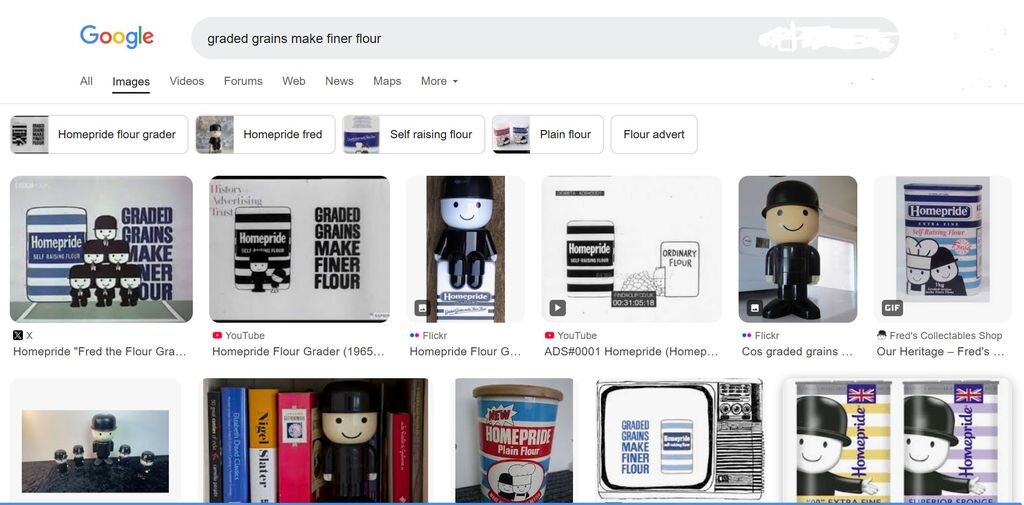
Jet Set Willie - your interpretation of my comment is spot on. The Home Pride graders (Fred and co) with a halo of flour
-
For those in the UK. A google search brings up....
-
Graded grains make finer flour.
-
[File] Manic Miner By S.P. And Bug Byte
Norman Sword replied to Norman Sword's topic in Download Discussions
I have added the extra keys used, in the file heading.- 7 replies
-
- 1
-

-
- norman sword
- rewrite
- (and 2 more)
-
People? Concerning MJSW V3 Extracted data from JSW Central Number of edited rooms: 81 84 Number of rooms accessible without cheating: 81 84 (There is an additional room in relation to the previous versions: "Blue sky", an almost empty room (except for a flying pig) located above "Rescue Esmerelda".) Number of rooms which need to be visited to complete the game: 80 ("Entrance to Hades" should be omitted as entering it results in a multiple-death scenario.) ========================================= V3 has 84 rooms - all rooms accessible, without cheating. In V2 the original data was mainly left. This did allow strange room jumps. So for V3 I went through the data and changed the data as needed, to remove most of those strange room jumps. In some cases it was just as easy to add interconnecting rooms to tidy up the room layout. In JSW jumping up from the Watch Tower takes you to room zero. The data was not set to any logically connected room, and the data was left as zero. So jumping upward from the Watch Tower takes you to room/cavern 0. Which is defined as The Off Licence Whilst most of the wrong interconnections were simply changed to the nearest logical room. In some cases I added the undefined logical room. So now 1 jumping upward from the "Watch Tower" takes you briefly into "Tower over". Where you immediately fall back into "Watch Tower". 2 jumping upward from "Rescue Esmerelda" takes you briefly into "Blue sky". Where you immediately fall back into "Rescue Esmerelda" 3 jumping left from "Out on a limb" takes you through "Limbless". Where you fall downward into "the Front Door" and carry on downward into "The Security Guard" 4 Falling into "Entrance to Hades" will drop through into "A brief Visit" and carry on falling into "The Security Guard" Whilst playing and not taking wrong paths. The only room that should be seen, very briefly, is "Blue sky". The other added rooms are to remove infinite death loops, or to place Willy back in a more logical game map position. Falling into "Entrance to Hades" is no longer a death loop. After losing a life you will end up in "The Security Guard" - Safe to carry on. Jumping left from "Out on a limb" is no longer a death loop. After losing a life you will end up in "The Security Guard" - Safe to carry on. Note also you can do the jump from "On top of the house" and land in "Ballroom East" with the loss of one life only.
- 50 replies
-
- 2
-
-
- norman sword
- 48k
- (and 3 more)
-
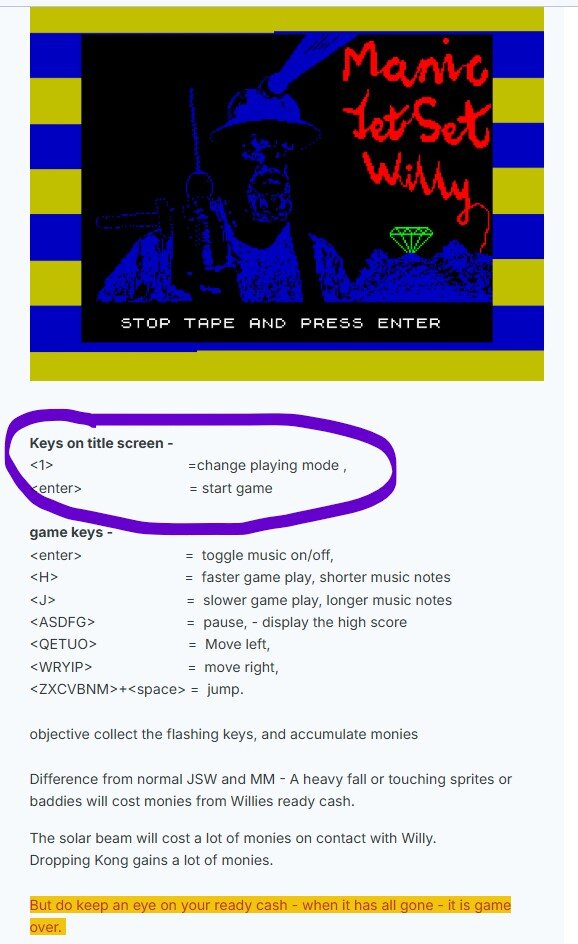
Variations in game playing mode - for V3.01 Whilst technically there are 4 modes. The random game modes can be treated as just one mode. Similar to having a shuffled pack of cards placed before you. Taking a card from anywhere in the pack or just taking the top card. Will always (or should) result in an unknown card. The random modes are similar to the pack of cards description. Whilst technically you are getting an unknown cavern (card) by differing methods of logic, the result is the same, An unknown cavern (card) Fixed by play Fixed by room random by play random by room. The graphics I display below are the graphics and colours as used in Manic Miner. Whilst I use the graphics (as defined in Manic Miner), I change the colours in usage to make the portals less conspicuous when viewed in a room. Description - Fixed by play Here the portals access rooms in the order that they are played in Manic Miner. No matter which room the portal is entered from, the first access will always give "The Central Cavern". Since Manic Miner has 20 portals and each room has a specific portal design. Every room with a portal will display the current Manic Miner room that can be accessed. So if none are accessed then all the portals, when they are passed will display the portal from "the central cavern" When that cavern has been completed. the next portal graphic will be displayed. "the Cold Room" The caverns are thus accessed in order -- defined by play. Description - Fixed by room Here the rooms define which Manic Miner cavern will be accessed. "The Bathroom" will always access "The Central Cavern" "First Landing" will always access "The Cold Room" In a similar way the graphic shown for any room with a portal, will in this mode. Always display the same Manic Miner portal graphic, and give access to the same Manic Miner room on every play. Description Random by play and Random by room Here the graphic for room access will always be just a question mark . Giving no clue as to which cavern will be accessed. As stated above whilst the logic to arrive at the cavern differs, the end result is just a random cavern from Manic Miner. After any Manic Miner cavern has been completed, then it can no longer be accessed by the random selection. Again similar to picking the cards from the pack. Once selected, it is no longer available. This does mean that the 20th cavern will always be known by logic. Simply being the only remaining cavern left to play. ----------------------------------------------------------------------------- Changing game mode. At the end of the scrolling message, I include the extra keys as used by MJSW which are not part of the keys used in Manic Miner or Jet Set Willy. I also wrote the keys into the game post ----------------------------------------- Hope the above answers your questions. ------------------------------------------ Addendum. V2 also allows for a change of game mode. Again the change in mode is accessed by pressing "1" on the title screen. The modes are the same as the first two listed for V3.01. With v2 there is no option of playing random order. In V3.02 - the random order is expanded to 20 random portal rooms from a list of 40 portal rooms. (that game is however not listed in any posts by me)



- 50 replies
-
- 2
-

-
-
- norman sword
- 48k
- (and 3 more)
-
A clip from Coronation Street ITV. (British TV , soap) Manic Miner, Jet Set Willy. Turns out - he was disappointed. JSW Manic Miner - Coronation Street.mp4
-
This was going to be the loader picture on the spider jsw special -- Unfortunately it uses too much memory at run time, to be incorperated into the game as a loader screen. It is based on the Card picture I have previously shown. This program using the picture from MJSW the Scroll surround of JSW2, the graphics of JSW and MM (plus the basics of the christmas card) Would have made a nice loaded game screen.... jjsw24_spider_loader-NotUsed.tap
- 50 replies
-
- 4
-
-
-
- norman sword
- 48k
- (and 3 more)
-
FOR jsw 2024 - Taking 16 (real) seconds to display a game clock minute. Allows for a quick and easy calculation for the framing rate of JSW 2024. Each displayed minute the game cycles 256 frames of display/animation. So every second the game displays 256/16 frames of animation. ---- update rate 16 frames a second MJSW fast displays 10 game MIN in 110 sec or 1 game min in 11 sec - so the framing rate is upped to around 23 frames (at fast speed) and mjsw SLOW displays 3 game MIN in 65 sec or 1 game min in 21.6 sec - so framing rate is slowed to around 11 frames (at slow speed) MJSW at slow speed was set to roughly the originals games speed so JSW Original around 11 frames per sec JSW 2024 around 16 frames per sec MJSW (fast) around 23 frames per sec -of course MJSW can be played at any one of 16 speeds ranging from the super fast down to the slow original speed.
-
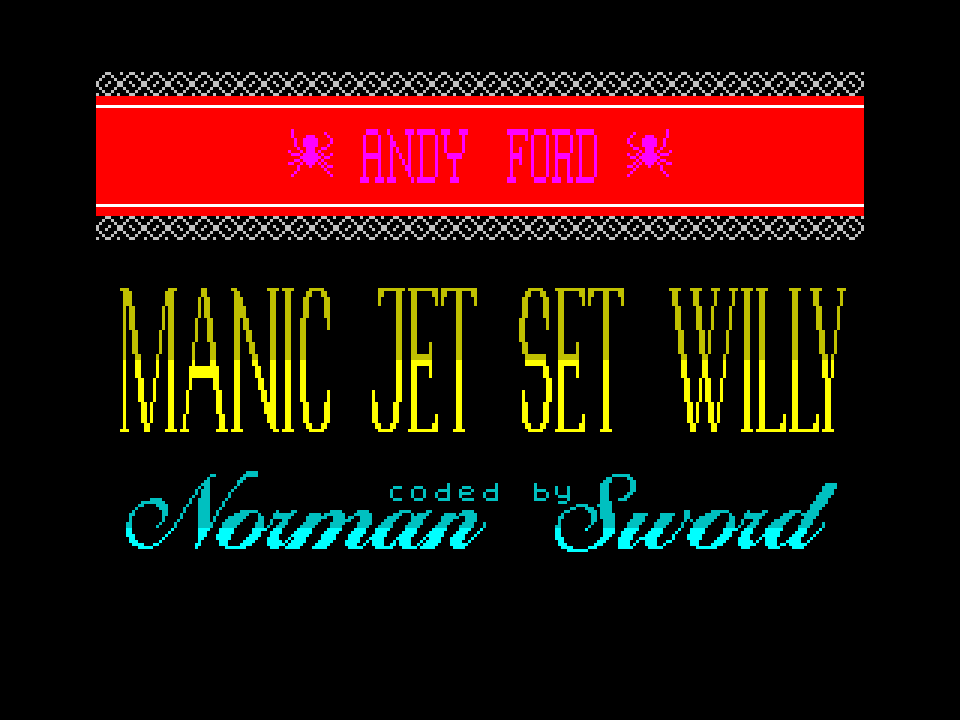
The last version V3.01 is the last official version. However I did carry on changing the file and did add a lot more code. As is usual the amount of code change was extensive, whilst what is seen is not a great deal. The purpose of the changes was to write spider a personal version. Note I say a personal spider version and NOT a new version. The last version was V3.01 (the last official version). The spider update is V3.02. --- The updates for the Spider only version stop at midnight December 31st. (if it had been a new version it would have had its version number updated to V4.00) - instead it is just a variant of the official release of V3.01 updated to V3.02 - Not for release. So what did I change. 1) Jet Set Willy was an edit of Manic Miner. Due to the editing Matthew did , the code for movement was changed to allow for stairs. That code change also modified how Willy interacts with Walls. I decided to change my code to remove the bug that Matthew had introduced with his stair collision check routine. The change I wrote only occurs when playing the Manic Miner style caverns. When playing the Jet Set Willy caverns, the bug, Matthew wrote, is left intact. Remember I am trying to leave the Matthew bugs/quirks intact, so as to not change the game play. 2) The main screen changes, as done in the attract mode, are done by a routine I call the curtain effect. The original code simulated the appearance of closing curtains across a window. That was subsequently modified to do more. 3a) Curtains - The last official version draws curtains from the outside of the screen and draws them inward. The number of curtains can be from 1 to 4, and in any combination of the four directions This gave something like 24 combinations for the curtain effect. 3b) I added code to draw curtains from the middle outward. (in pairs, or four) 3c) I added code to remove the combinations of curtain that to me did not aesthetically look perfect. That was all the combinations that involved 3 curtains. 3d) I added code to slow down pairs of curtains that by logic revealed the screen faster than single sweep curtains. 3e) I added code to make an SFX on curtain reveals 3f) I wondered if I could add diagonal curtains. The answer was yes and they were added Each and every addition of code needed me to find other code that I could rewrite to make that code smaller. So whilst the above changes are not large pieces of code. The space for every addition was not available, until other code was modified to increase the available space. 4) I redesigned the credits page. For that I needed more graphics. 4a) I added a graphic to replace the Andy Ford text 4b) I modified the graphic drawing routine to allow changes in the graphic output via the insertion of inline code parameters. 5) I changed the method of changing the game music tempo. 5a) the music tempo now tracks the game speed more accurately. 5b) I removed the static Willies. They now dance all the time. The Music on/off has an icon indicating the sound status. 5c) I slowed the overall speed of the game down. The slowing down of the overall game speed was to enable the game to play at the original game speed of Jet Set Willy. So MJSW at its slowest speed setting will now play at about the same speed as the original JSW. A side effect of the slowing down is it slows down all speeds. Whilst the fastest speed is still fast, it still has a big delay incorporated into each loop. 5d) I can/could remove the unneeded delay from the game loop introduced by the overall slowing down. Instead I use that extra delay to change the super fast music clicks into a more pleasing blip. 6) When cash is being taken from Willies ready cash for life rejuvenation. It now highlights and flashes the cash when it is depleted to zero. 7) When spider played the game without the sound on. It was obvious that KONG needed to have some SFX's. 7a) When the switch in the KONG room is flipped a compound SFX is played 7b) Followed by a slight delay 7c) followed by an SFX as periodically a piece of the wall barrier is erased 7d) KONG drop SFX and speed was changed. Eight) I Added some more objects to collect in the JSW part of the game. Just checked MJSW v3.02 now has 132 object in the JSW part of the game. No additions of objects in the Manic Miner part of the game. 8a) the added object (in most cases) are not objects that will take any effort to collect. The added objects on the whole are placed where Willy normally travels. 9) The portals are restricted to 20 known places when played in "fixed by play" or "fixed by room". In order to add more change when playing in the "random by room" or "random by play" versions. I have added an extra 20 portals. 9b) the random versions now selects 20 portals from a list of 40 portal locations. So the random element has the added variation of not being able to predict which room will have a portal in it. 10) Skylab crash SFX changed 11) The revealing of the final barrel/ Plinth screen (GAME OVER SCREEN) was done in MJSW v3.01 by scrolling the screen upwards. That was replaced by a routine to scroll the screen downwards. And finally for this version even that was replaced by a random reveal routine. 11a) the plinth or Barrel graphic is decided now by which screen/cavern he was in when he met his final demise. So in MM screens he will be placed on a plinth, and for JSW room on a barrel. In V3.01 only the barrel is used. 12) added sound to the congratulations final screen. 13) lots more - just not listed. Whilst the topics mentioned above have changed and can be seen or heard. The game code has been changed to enable me to add the above changes. So whilst V3.02 started as the code of V3.01 it has a very different look. On reflection of what I wrote above. I wondered why I added a slow down to the game speed. Just now I have remembered that one of the updates/test pieces of code I wrote was investigating the screen refresh routine. I ended up writing around six or seven differing versions, each using vastly different ways to update the screen. In code changes of this sort, the code has many design criteria it needs to meet. The ultimate code would be a logic change that removes all the code, so it becomes a routine that consumes no memory and runs instantly. That aim in most cases can not be met. In MJSW the code is already suffering from constraints to how much memory it is allowed to use. So in order to add these test routines. I switched off the curtain effect the multiple graphics on the JSW title screen, the animated end game pac man and the bed jump fanfare. With those routines removed I had a few kilobytes of now unused memory. The screen update code changes were time consuming to write, the differing versions allowed me to investigate which was the most viable to continue with as a means of updating the screen. Each version ran at a different speed. The fastest code version, was also the version that consumed far too much memory. The code I ended up using, was a compromise between speed and size. Once the code was picked for usage. I then needed to scan every routine I had written in the game and investigate how I could shorten that code to enable me to add the new screen update routine. Without going into further detail - I managed to add the new screen update code and re insert all the routines I had originally switched off .... Hence the next decision to slow the game down again. see 5c above. Remember V3.01 is the last official version. V3.02 is a spider modified revision - meant for spider only, and "I" will not post that version here.
- 50 replies
-
- 3
-
-

-
- norman sword
- 48k
- (and 3 more)
-
JetSetWilly start game game mode 0 - - collect last object game mode 1 - maria removed - object number defined by a specific byte - not by actual objects jump on bed game mode 2 - forced walk to toilet - room + x position defined - reach the x position to trigger reached toilet game mode 3 - animated head/toilet graphic - room + x position defined - reach the x position to trigger
-
I remember seeing the MSX bee card - It was played on an MSX by Alan Maton, just for me. The card was a pre release demonstration.
-
Several incorrect assumptions. The game logic only allows "the ITEM draw logic" to collect ITEMS. Other logic can leave colour that "the ITEM draw logic" will react to. So sprites can not collect an item Background colour will not collect an item Arrows do not collect items All the above do is colour in the ink cells and that allows "the ITEM draw logic" to assume when it detects white that Willy is over the ITEM, and then "the ITEM draw logic" will collect it. To have an invisible item. All that is needed is to define a graphic with no pixels present. "The ITEM draw logic" will draw the invisible item. If A white sprite/an arrow or Willy walks over the item. Then the fact that white is now present in the square where the item is defined is enough for "the ITEM draw logic" to collect the invisible item.
-
My game - What a Wonderful World of Willie
Norman Sword replied to Jet Set Willie's topic in Remakes
Can confirm it loads and looks like your picture. The title screen looks strange as well - (But with artistic licence - perhaps that is how it is meant to look)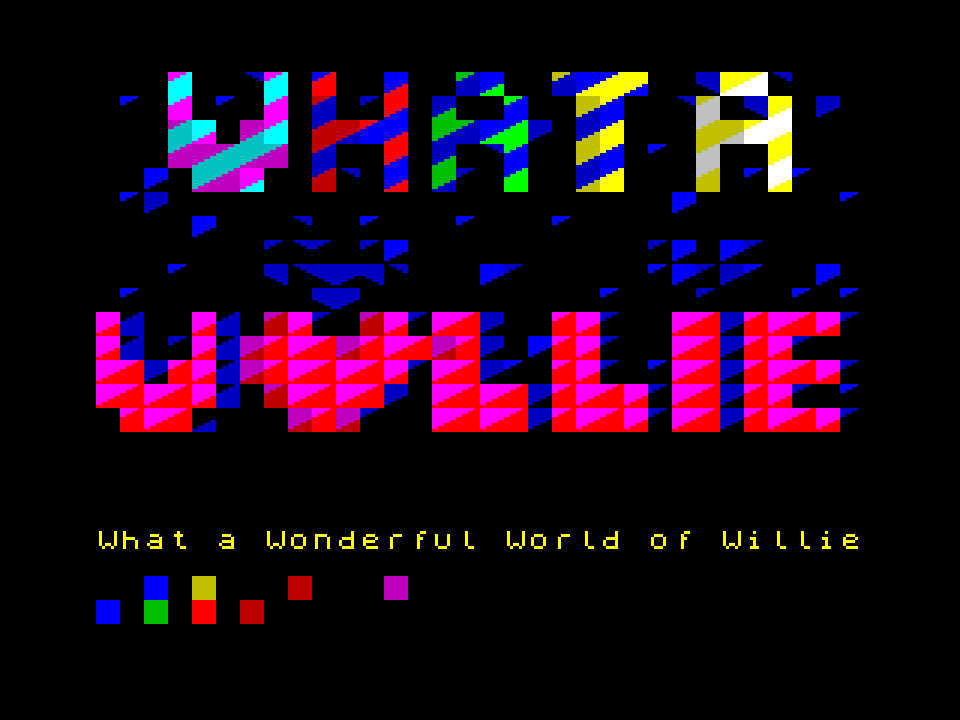
-
Can confirm Both of the above run on my windows 10 PC.